


How to Design an Emergency Dispatch Center: Workstations, Layout and Control Room Requirements

An emergency dispatch center must support fast communication, accurate information handling, and continuous coordination between operators. Unlike a conventional office, every workstation needs to remain functional under sustained operational pressure.
The physical environment plays an important role in this process. A well-designed dispatch center should give operators clear access to communication equipment, displays, computers, and shared information while allowing supervisors and technical teams to work effectively around them.
For project owners, architects, and system integrators, the control room console should therefore be considered as part of the operational design—not simply as office furniture.

What Should an Emergency Dispatch Center Include?
A typical emergency dispatch center may include:
Dispatcher workstations
Supervisor positions
Multi-monitor displays
Radio and communication equipment
Computer and network equipment
Large shared displays or video walls
Recording and monitoring equipment
Power and data distribution
Storage and equipment access areas
The exact configuration depends on the type of emergency service, operator numbers, communication infrastructure, and room dimensions.
The first design decision should be understanding how information moves through the center.
An operator may receive an incident report, verify information, communicate with field personnel, update records, and coordinate with another department within the same workflow.
The workstation should support these activities without unnecessary movement.
1. Determine the Dispatcher Workstation Requirements
Start with the number of operators working simultaneously rather than the total number of employees assigned to the center.
Consider:
Operators per shift
Number of dispatch teams
Supervisor positions
Number of monitors per operator
Communication devices
Computer equipment
Required storage
Future staffing requirements
This information establishes the basic workstation count and helps determine whether the room should use straight, corner, curved, or combined console configurations.
2. Plan the Console Around Operator Workflow
Emergency dispatchers often work with several information sources at the same time.
A typical workstation may need to support:
Communication → Information verification → Dispatch → Monitoring → Documentation
The console should keep frequently used equipment within practical reach.
For example, monitors should be positioned for continuous viewing, while keyboards, communication controls, and other frequently used devices should remain accessible without forcing the operator to repeatedly change position.
This is one of the key differences between a mission-critical dispatch console and a standard office desk.
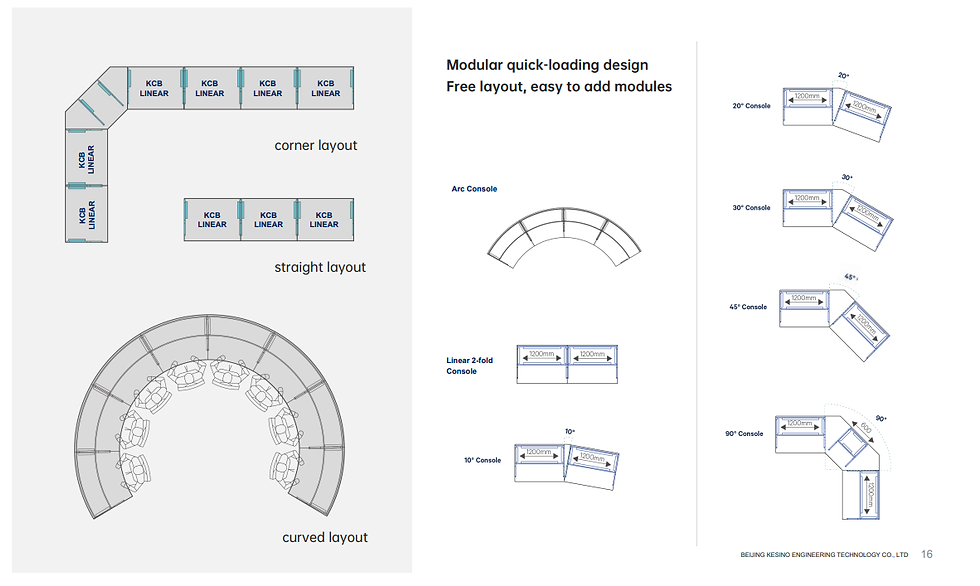
3. Choose the Appropriate Control Room Layout
Straight Console Layout
Straight rows are suitable for rooms where operators work in clearly defined positions.
Advantages include:
Efficient use of wall space
Simple workstation allocation
Straightforward cable routing
Easy future extension
Corner Layout
Corner configurations can connect two workstation sections and make better use of rooms with multiple usable walls.
They can also help create distinct operator groups without completely separating the teams.
Curved Layout
Curved configurations can create a more centralized working environment.
They are useful when operators need frequent communication with nearby team members or when the room is organized around shared displays.
Combined Layout
Larger dispatch centers may use multiple configurations in one room.
For example, dispatcher positions can be arranged in a main row while supervisors or specialized teams occupy adjacent sections.
The best layout is determined by workflow and room geometry—not by choosing the most visually impressive shape.
4. Design for Multi-Monitor Operations
Emergency dispatchers increasingly work with multiple digital information sources.
Depending on the operation, screens may display:
Dispatch software
Incident information
Maps
CCTV feeds
Communication platforms
Resource locations
Alerts
Operational dashboards
The console should provide enough surface area and structural support for the required monitor arrangement.
Monitor arms can also make individual displays easier to position and maintain.
The objective is not to install the maximum number of screens.
The objective is to ensure that critical information remains visible without creating unnecessary visual or physical clutter.
5. Separate Individual and Shared Information
An emergency dispatch center usually has two levels of information.
Individual Information
The dispatcher needs information directly related to their assigned incidents and communication tasks.
Shared Information
The entire team may need access to information such as:
Major incidents
Overall operational status
Resource availability
System alerts
Priority events
A video wall or large shared display can provide this common operational view while individual monitors handle detailed tasks.
This separation helps prevent the shared display from becoming overloaded with information that only one operator needs.
6. Integrate Communication and IT Equipment
Dispatch workstations may contain significantly more technology than conventional office furniture.
Equipment planning can include:
Computers
Network connections
Radio equipment
Headsets
Communication controls
KVM equipment
Power distribution units
Display connections
Other specialized devices
The console should accommodate these components from the beginning.
Trying to add equipment after the furniture has been installed often creates unnecessary cable congestion and makes future maintenance more difficult.
7. Make Cable Management Part of the Design
Power and data routing should be incorporated into the console structure.
A well-designed console can provide separate pathways for different types of connections while keeping service access available to technicians.
Important considerations include:
Power distribution
Network cabling
Display cables
Communication connections
Equipment connections
Spare capacity for future devices
Technician access
Good cable management is not only about appearance. It directly affects maintenance and future modifications.
8. Consider 24/7 Operator Ergonomics
Emergency dispatch centers may operate continuously, which means the workstation needs to remain practical during long shifts.
Important factors include:
Desk height
Monitor viewing position
Keyboard and mouse placement
Legroom
Chair clearance
Reach distance
Lighting
Operator circulation
Where the operation requires it, height-adjustable console configurations can provide additional flexibility.
The goal is to create a workstation that supports sustained concentration rather than simply fitting equipment into a limited footprint.
9. Give Supervisors an Effective Position
Supervisors often need a broader view of the operation.
Their workstation may need to provide visibility of:
Dispatcher activity
Shared displays
Team communication
Major incidents
Operational status
The supervisor does not always need a separate room.
In many dispatch environments, positioning the supervisor within or immediately adjacent to the main operator area can support faster communication and escalation.
10. Plan for Maintenance and Future Expansion
Emergency dispatch technology can change over the life of the facility.
New communication equipment may be introduced. Additional displays may be required. The number of operators may increase. Existing equipment may need replacement.
The console design should therefore provide access for maintenance and enough flexibility for future changes.
Before selecting a manufacturer, ask:
Can workstation sections be reconfigured?
Can additional monitor arms be installed?
Is equipment easy to access?
Are power and data routes serviceable?
Can the layout be expanded?
Can the manufacturer provide revised layouts when requirements change?
These questions are particularly important for projects expected to operate for many years.
Emergency Dispatch Center Console Checklist
Before approving the final design, review the following:
Operator count per shift
Supervisor positions
Monitor configuration
Communication equipment
Computer and network equipment
Shared display requirements
Console configuration
Power and data routing
Cable management
Equipment access
Operator ergonomics
Circulation space
Maintenance requirements
Future expansion
What Makes a Good Emergency Dispatch Console?
A good emergency dispatch console should support the complete operator workflow while providing a stable platform for monitors, communication equipment, computers, power, and data connections.
The most important characteristics are:
Workflow-oriented design — equipment is positioned according to operator tasks.
Clear visibility — critical information can be viewed without unnecessary movement.
Integrated equipment support — computers, monitors, communication devices, and accessories are considered during design.
Organized cable management — power and data connections remain accessible.
Ergonomic operation — the workstation supports extended periods of use.
Maintainability — technicians can access equipment without major disruption.
Modularity — the room can adapt as operational requirements change.
For customized emergency dispatch projects, Kesino can develop console configurations according to operator numbers, room dimensions, monitor requirements, equipment integration, and workflow.

FAQ
What is the best layout for an emergency dispatch center?
There is no single best layout. Straight, corner, curved, and combined configurations can all be appropriate. The correct choice depends on operator numbers, room dimensions, communication requirements, and workflow.
How many monitors should an emergency dispatcher have?
The number depends on the dispatch software, communication systems, mapping requirements, and operational responsibilities. The priority should be clear access to critical information rather than maximizing screen count.
What equipment should be integrated into a dispatch console?
Depending on the operation, this may include computers, monitors, radios, communication controls, network connections, KVM equipment, power distribution, and other specialized devices.
Why is cable management important in a dispatch center?
Dispatch workstations can contain numerous power, network, display, and communication connections. Proper routing keeps the workspace organized and makes maintenance and future upgrades easier.
Should emergency dispatch consoles be height adjustable?
Not every project requires height adjustment. The decision should be based on operator requirements, workstation configuration, and the operating model of the center. Where flexibility is important, adjustable configurations can be considered.
Can an emergency dispatch center be expanded later?
Yes, provided expansion is considered during the initial design. Modular consoles and planned spare capacity can make it easier to add workstations, displays, and equipment later.
Conclusion
An emergency dispatch center should be designed around the work performed inside it.
Operator positions, communication equipment, monitors, shared information, cable routing, ergonomics, maintenance access, and future expansion all need to be considered before the final console layout is approved.
For project owners and system integrators, the most effective approach is to develop the room layout, workstation configuration, equipment integration, and console design as one coordinated solution.
That approach creates a dispatch environment that is organized for today's operational requirements while remaining adaptable to future changes.


Comments